
A few months ago, I started asking a simple question:
Could a lightweight cybersecurity system detect suspicious activity in a computer lab without relying on expensive enterprise software?
What began as a small experiment quickly evolved into a full cross-platform monitoring platform capable of detecting USB insertions, DNS activity, AI website access attempts, and real-time client behavior across Linux and Windows systems.
That project became Zero-Hack.
I wanted to explore whether a lightweight, fully self-hosted, cross-platform monitoring system could solve modern examination monitoring problems using open-source technologies.
The Problem With Modern Exam Labs
Most institutions still rely on manual monitoring during lab examinations. While this works for small environments, it quickly becomes ineffective at scale.
- Unauthorized USB drive usage
- AI website access during exams
- Cloud-based file sharing
- No centralized monitoring
- No forensic evidence after incidents
Existing commercial solutions are often expensive, platform-dependent, and difficult to customize for institutional requirements.
The goal was simple: Build a lightweight forensic monitoring platform that works across both Linux and Windows systems.
Why Existing Solutions Weren’t Enough
Most existing exam monitoring platforms fall into one of two categories:
- Enterprise software that is expensive and difficult to customize
- Browser-based lockdown systems that fail outside the browser environment
Neither approach solved the actual problem: real-time system-level visibility.
I wanted a solution capable of observing the operating system itself — not just the browser window.
System Architecture
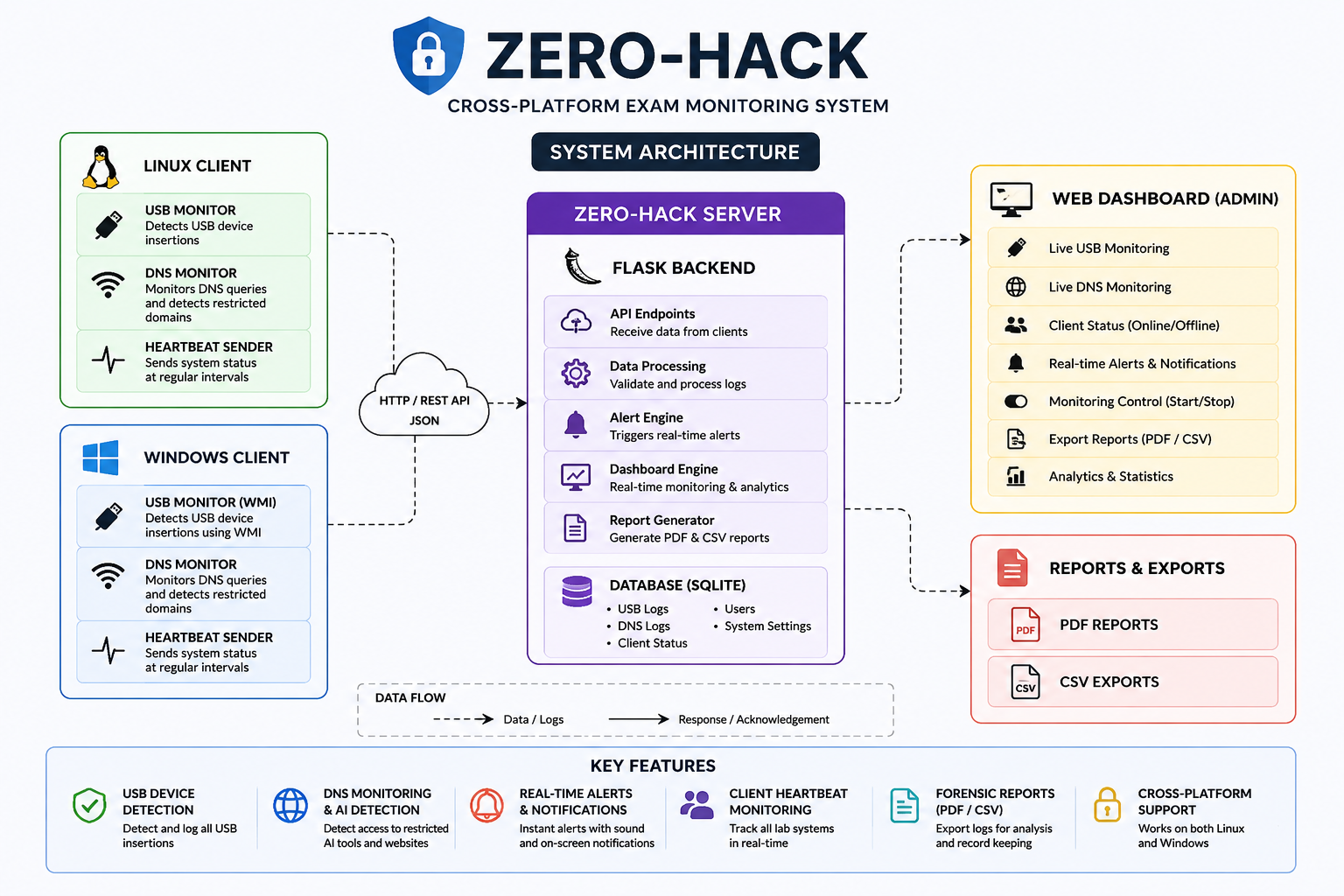
Zero-Hack follows a centralized monitoring architecture. Lightweight Python clients run on lab systems and continuously communicate with a Flask-based monitoring server.
Technology Stack
Backend
Flask + SQLAlchemy
Client Monitoring
Python
DNS Traffic Analysis
Scapy
USB Detection
pyudev + WMI
Frontend
Tailwind CSS
Database
SQLite
Building the Flask Backend
The server-side infrastructure was built using Flask because of its simplicity, modularity, and rapid development workflow.
The backend handles:
- USB forensic logging
- DNS monitoring logs
- Client heartbeat tracking
- Dashboard rendering
- PDF & CSV exports
- Authentication & session management
Real-Time USB Monitoring
One of the most important forensic features of Zero-Hack is USB device detection.
Linux Implementation
On Linux systems, I used pyudev to listen for kernel-level block device events.
Whenever a removable device is inserted, the client captures:
- PC Name
- Operating System
- USB Serial Number
- Timestamp
Windows Implementation
Since pyudev is Linux-specific, the Windows client required an entirely different implementation.
I used Windows Management Instrumentation (WMI) for hardware event monitoring.
This allowed Zero-Hack to maintain identical forensic capabilities across both operating systems.
Cross-Platform Design
One of the primary goals of Zero-Hack was maintaining consistent monitoring capabilities across both Linux and Windows environments.
Since operating system APIs differ significantly, platform-specific implementations were required for hardware monitoring, permission handling, and forensic logging.
Despite these differences, both clients communicate with the same centralized Flask backend, allowing unified monitoring across heterogeneous lab environments.
DNS Monitoring & AI Website Detection
DNS monitoring became one of the most technically interesting parts of the project.
Using Scapy, the client continuously sniffs DNS traffic in real time.
Every queried domain is analyzed and compared against a blocked-domain database.
If a restricted AI platform is detected:
- The activity is logged
- The dashboard receives a live update
- A SweetAlert notification is triggered
- Real-time audio alerts are triggered
AI Platform Restriction
To actively restrict AI tools during examinations, Zero-Hack dynamically modifies the system hosts file.
Linux Hosts File
/etc/hosts
Windows Hosts File
C:WindowsSystem32driversetchosts
This allows restricted domains to be redirected locally, effectively blocking access to unauthorized platforms.
Building the Dashboard
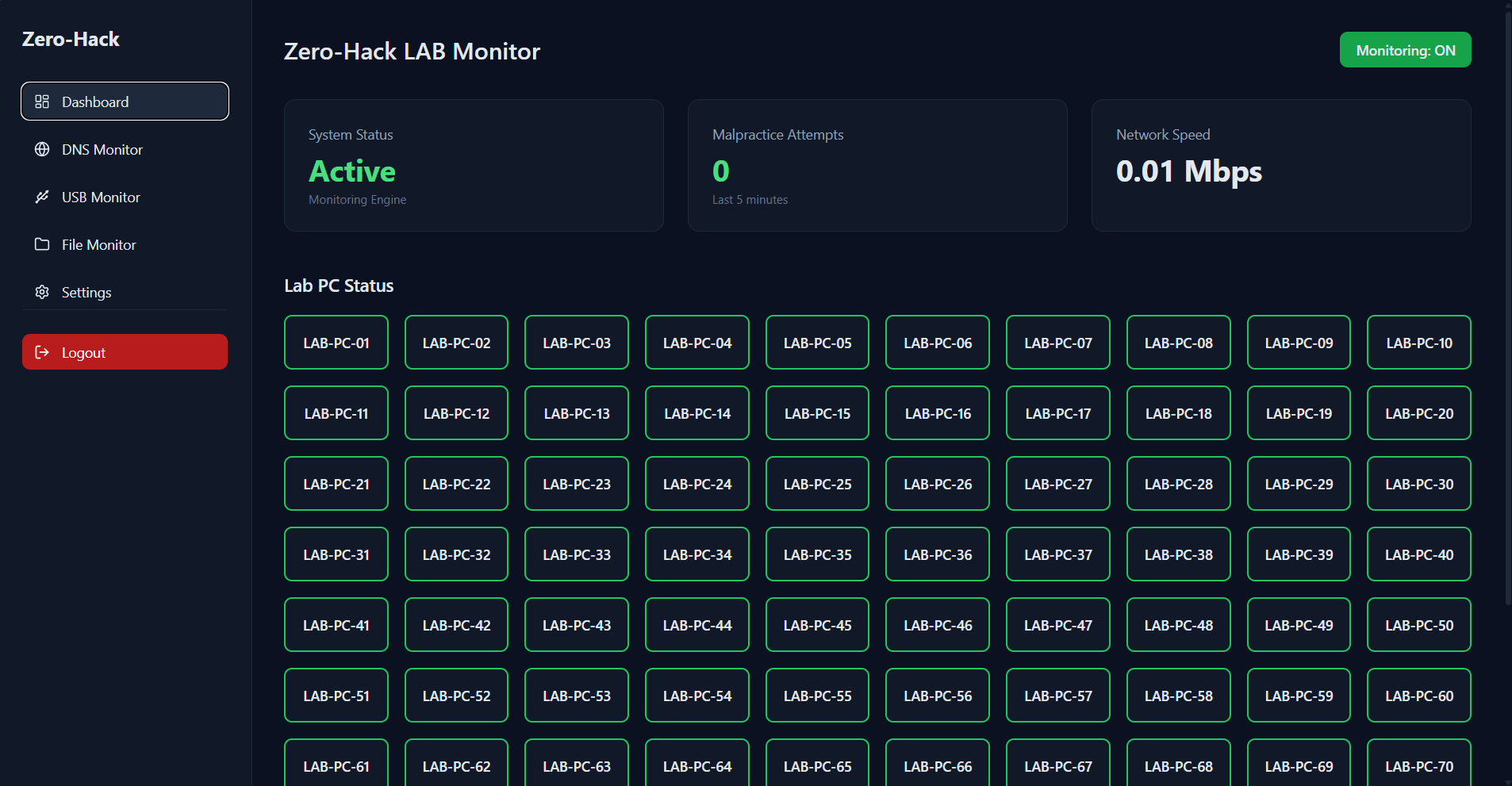
The dashboard interface was built using Tailwind CSS and dynamic JavaScript rendering.
Features include:
- Live USB monitoring
- DNS activity logs
- Online/offline client tracking
- Monitoring toggle system
- PDF & CSV export
- Real-time notifications
Security Considerations
Since Zero-Hack operates at the system level, security and permission handling became critical parts of the architecture.
The monitoring clients require elevated privileges for:
- DNS packet inspection
- Hosts file modification
- USB hardware monitoring
To reduce risk, all communication between clients and the monitoring server was restricted to the local lab network.
Future versions will include:
- Encrypted client communication
- JWT authentication
- Role-based access control
- Secure audit logging
Why SQLite?
Although larger deployments would typically use PostgreSQL or MySQL, SQLite was intentionally selected for the initial version of Zero-Hack.
The project was designed primarily for:
- Educational institutions
- Offline lab environments
- Simple deployment workflows
- Minimal infrastructure requirements
SQLite allowed the platform to remain fully self-contained while simplifying deployment significantly.
Forensic Report Generation
One of the most useful capabilities of the platform is automated forensic report generation.
Using ReportLab, the server generates:
- CSV Reports
- PDF Reports
- Timestamped forensic evidence
- Branded exports with logos
System Performance
- ~40MB RAM usage per client
- Minimal CPU utilization during monitoring
- Sub-second event reporting latency
- Supports Linux and Windows clients
- Runs entirely on local network infrastructure
Deployment Strategy
To simplify deployment inside computer labs, the client applications were packaged into standalone executables using PyInstaller.
This eliminated the need for manually installing Python dependencies on each machine.
The monitoring server could then be deployed on a single centralized system accessible across the local network.
Challenges Faced
Building a cross-platform monitoring system introduced several platform-specific challenges.
| Challenge | Solution |
|---|---|
| Linux-only pyudev | Implemented WMI for Windows |
| DNS sniffing permissions | Administrator/root execution |
| Hosts file differences | OS-specific path handling |
| Cross-platform packaging | PyInstaller builds |
Lessons Learned
Building Zero-Hack taught me that system-level monitoring is far more complex than traditional web development.
Working directly with operating system events, DNS traffic, and hardware detection introduced an entirely different layer of engineering challenges.
- Cross-platform compatibility always adds unexpected complexity
- Real-time systems require careful resource optimization
- DNS traffic can become noisy extremely quickly
- False positives are a real-world engineering problem
- Monitoring systems must remain lightweight and reliable
Future Improvements
Although Zero-Hack already provides real-time forensic monitoring capabilities, there are several areas planned for future expansion.
- HTTPS traffic inspection
- Screenshot monitoring
- Webcam-based invigilation
- AI-assisted anomaly detection
- Cloud synchronization
- WebSocket real-time updates
- Institution-wide forensic tracking
- Automated suspicious activity scoring
- Enterprise lab monitoring support
Final Thoughts
Zero-Hack became much more than a monitoring tool.
It became a deep exploration into operating systems, cybersecurity workflows, real-time networking, and forensic system design.
More importantly, it proved that modern open-source technologies can be combined to create highly capable monitoring systems without relying on expensive enterprise infrastructure.
This project is still evolving — and there’s much more to build.